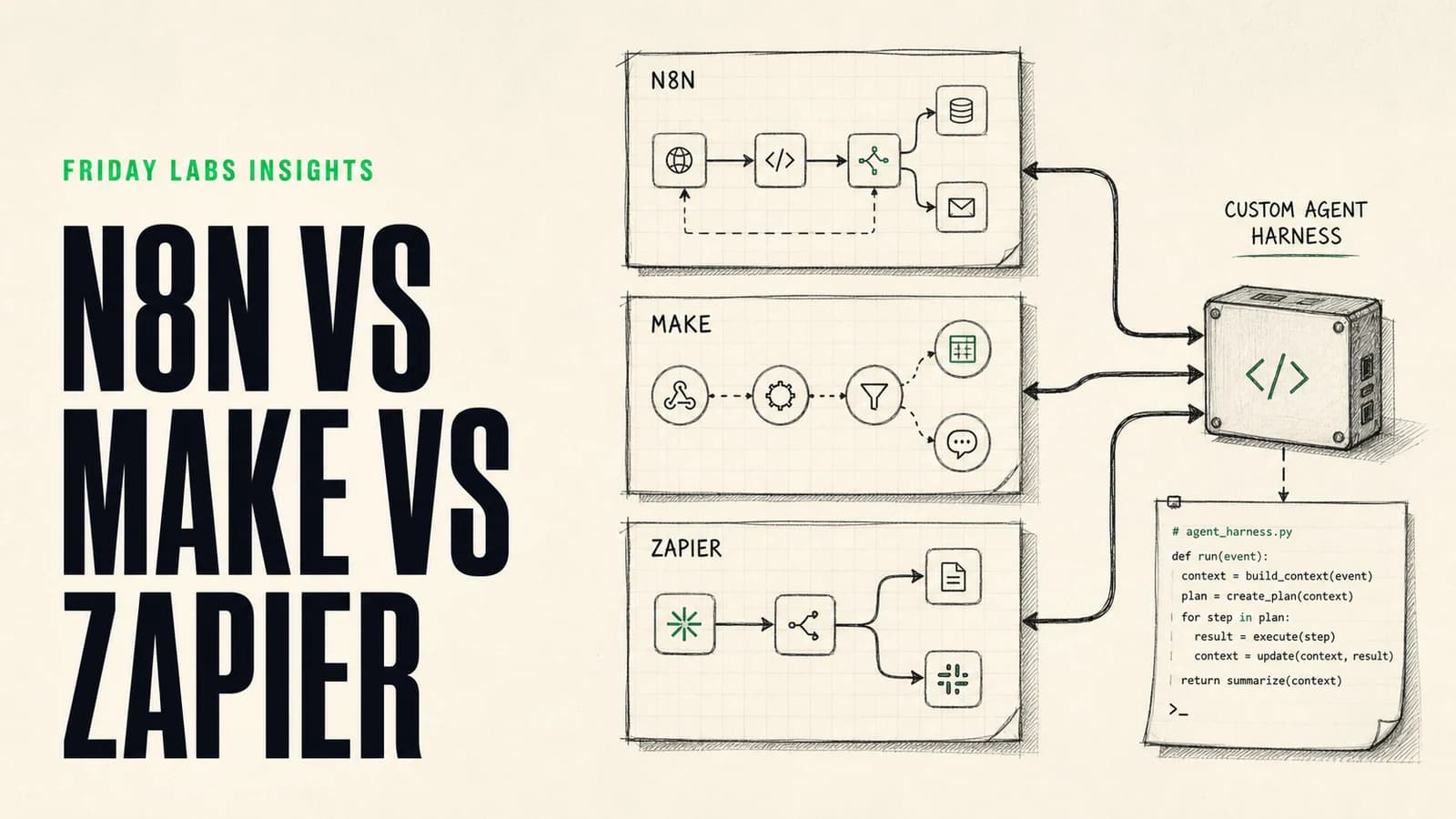
Zapier, Make, and n8n can all automate serious business processes. All three now support AI-powered steps, and each is moving toward more agentic behavior. A custom agent harness goes further by giving a technical team control over the complete software layer around the model.
The right choice is less about which product has the longest feature list and more about the workload, failure risk, data requirements, and people who will own the system.
Quick verdict: Choose Zapier for fast, approachable automations across a broad app catalog. Choose Make for visual, multi-branch operational workflows. Choose n8n for technical flexibility, AI-heavy flows, and a self-hosting option. Build a custom agent harness when the agent itself is a strategic product or needs controls that a general automation platform cannot provide.
Comparison at a glance
| Area | Zapier | Make | n8n | Custom harness |
|---|---|---|---|---|
| Best fit | Fast team-owned automation | Complex visual operations | Technical and AI-heavy workflows | Product-level agent systems |
| Builder style | Linear steps | Visual canvas | Node-based canvas | Code and custom interface |
| Learning curve | Lowest | Moderate | Moderate to high | Highest |
| Integration approach | Large native catalog plus APIs | Strong modules plus flexible APIs | Native nodes, APIs, code, custom nodes | Any API or internal service you build |
| Hosting | Managed cloud | Managed cloud | Managed cloud or self-hosted | Your cloud, managed platform, or on premises |
| AI pattern | AI steps, agents, MCP | AI steps and agent scenarios | AI nodes and agent workflows | Fully controlled tools, memory, evaluations, and policy |
| Governance ceiling | Good for standard business automation | Good visual controls and error paths | Strong technical control | Highest potential, highest responsibility |
| Maintenance owner | Operations or RevOps | Automation specialist | Technical operator or developer | Software team |
No row makes one platform universally better. It shows the kind of organization each option expects around it.
What changed: automation platforms now include agents
The old comparison was simple. Zapier was easiest, Make was more visual and flexible, and n8n was more technical. That is still broadly true, but it is no longer enough.
Zapier now spans traditional Zaps, AI steps, agents, MCP connectivity, and developer tooling. Make distinguishes between standard scenarios, fixed-path scenarios with AI, and agent scenarios where AI decides the route. n8n combines deterministic workflow nodes with model, memory, retrieval, and tool integrations.
The useful comparison is now two-dimensional:
- How well does the platform run predictable workflows?
- How safely and transparently can it support variable AI behavior?
A tool can be excellent at one and only adequate at the other.
Zapier: the fastest path to a useful automation
Zapier remains the easiest recommendation when a non-technical team needs to connect common SaaS tools quickly.
Its strengths are clear:
- A broad integration catalog.
- A linear interface that is easy to explain.
- Fast setup for triggers, actions, filters, and basic transformations.
- A large ecosystem of templates and documentation.
- AI features that can be added without rebuilding the whole process.
Zapier works particularly well for short workflows such as adding qualified leads to a CRM, sending internal alerts, updating a contact after a form submission, or generating a draft from structured inputs.
Where Zapier becomes less comfortable
Large loops, extensive branching, complex payload transformations, and high-volume multi-step processes can become difficult to read and expensive to run. A linear view is approachable at the beginning, but it can hide the shape of a complicated process.
That does not mean Zapier cannot support complex work. It means the team should examine the complete task count, exception handling, and maintenance experience before building the core of an operation on it.
Choose Zapier when speed to first value and internal accessibility matter more than deep infrastructure control.
Make: a visual operating map for complex workflows
Make presents the process as a visual canvas. Routers, filters, iterators, aggregators, formulas, and error handlers make it easier to see how data moves through a multi-branch system.
Its strengths include:
- Strong visibility into branching and data flow.
- Flexible mapping and transformation tools.
- Practical handling of arrays, JSON, dates, and bulk records.
- Reusable scenarios and visual error routes.
- A natural path from deterministic scenarios to AI-assisted or agentic scenarios.
For operational workflows, the canvas often acts as both implementation and documentation. A trained operator can inspect where a record went, review the bundles passed between modules, and understand the major business rules.
Where Make becomes less comfortable
The canvas can become dense when a scenario tries to do too much. Complex formulas may be difficult for a new owner to understand, and careless operation design can multiply usage. Like any visual builder, Make benefits from modular workflows, naming standards, notes, and a clear separation between orchestration and heavy application logic.
Choose Make when the process has meaningful branches and transformations but should remain visible to an automation specialist rather than living entirely in code.
n8n: technical control without starting from a blank repository
n8n feels closer to a development environment. It combines a visual editor with direct API calls, code nodes, custom nodes, credentials, webhooks, and self-hosting.
Its strengths include:
- Flexible JavaScript and Python steps.
- Strong support for custom APIs and AI components.
- Cloud and self-hosted deployment options.
- Execution history and retry tooling.
- A lower barrier to technical experimentation than a fully custom application.
n8n is compelling when a team needs to blend workflow orchestration with custom model logic, retrieval, or services that do not have polished native connectors.
Its execution history supports inspection and retries, and its security audit can identify common configuration risks in a self-hosted instance.
Where n8n becomes less comfortable
Self-hosting is control, not free operations. The organization becomes responsible for updates, backups, secrets, availability, scaling, and incident response. Even on managed hosting, technical workflows can become hard to maintain if every exception turns into another large code node.
Choose n8n when a technical owner is available and the workload benefits from deeper control than a standard no-code platform provides.
Custom agent harness: when the automation becomes software
A custom harness is appropriate when the system needs a purpose-built interface, proprietary tools, fine-grained access, durable state, automated evaluations, or deployment practices that general platforms cannot support cleanly.
The harness might include:
- A task-specific web application.
- A permission service that limits each tool call.
- Versioned prompts and policies.
- Retrieval from approved internal data.
- Durable run state and resumable jobs.
- Human review queues.
- Traces, evaluation datasets, and release gates.
- Cost and latency budgets.
This is the most flexible option and the easiest to overbuild. It is justified when the system creates strategic differentiation, serves customers directly, or carries enough operational risk to require software-level controls.
If a visual workflow can solve the problem reliably, custom code may add cost without adding business value.
Compare the real cost, not the subscription page
Each platform meters work differently, and pricing changes. Do not compare plans using one hypothetical automation.
Model the actual workload:
- Number of incoming records or events.
- Average steps per successful run.
- Loops over line items or documents.
- Polling frequency.
- Retries and failure paths.
- Model tokens and external API costs.
- Data transfer and storage.
- Human maintenance time.
- Infrastructure and on-call responsibility.
A cheap self-hosted workflow can become expensive if it requires regular engineering attention. A higher managed subscription can be economical if it keeps ownership with the operations team. A custom harness has the highest upfront cost but can be correct when it replaces several tools or powers a differentiated product.
Hosting and data control
Data control is more nuanced than “cloud bad, self-hosted good.”
With managed platforms, review data retention, subprocessors, regional options, access controls, audit logs, and the terms of each AI provider used inside the workflow.
With self-hosting, review network access, encryption, backups, secret management, update cadence, and who can inspect execution data. n8n notes that binary data may require a deliberate storage configuration when scaling; its external storage documentation is one example of the infrastructure decisions a self-hosted team must own.
The secure option is the one configured and operated correctly for the data involved.
Reliability and observability
All four options need a production operating layer.
At minimum, define:
- A unique run identifier.
- Clear success, partial success, and failure states.
- Idempotency rules so retries do not duplicate actions.
- Error routes and ownership.
- Alerts for silent failures and unusual volume.
- Redaction rules for sensitive execution data.
- Version control for important logic and prompts.
- A human path for uncertain or consequential decisions.
Agentic systems need more. They require traces of tool selection, intermediate decisions, context, and outcomes. Read our full guide to monitoring AI agents before allowing an agent to write to critical systems.
Which platform should you choose?
Choose Zapier when:
- The workflow is short and mostly linear.
- Common SaaS integrations cover the job.
- A non-technical team should maintain it.
- Speed matters more than deep customization.
Choose Make when:
- The process has several visible branches.
- Data transformation and bulk handling matter.
- An automation specialist will own the system.
- Visual debugging is valuable.
Choose n8n when:
- The process needs custom APIs or code.
- AI orchestration is central to the workflow.
- A technical owner is available.
- Self-hosting or infrastructure control is a real requirement.
Build a custom harness when:
- The agent is part of the product or a core operating advantage.
- General platforms cannot express the permission model or interface cleanly.
- Automated tests, releases, and evaluation gates are required.
- The organization is prepared to own software, not just an automation.
A better selection process
Use the same process regardless of platform:
- Map the current workflow and its exceptions.
- Separate fixed rules from ambiguous judgment.
- Define the systems of record and required permissions.
- Estimate volume using real data.
- Design failure handling before the happy path.
- Build a thin representative slice.
- Test with edge cases and realistic load.
- Assign a named owner for monitoring and changes.
The choice often becomes obvious after the process is mapped properly. Platform debates are usually a symptom of an undefined workflow.
Practical walkthrough: This independent tutorial shows how an n8n AI agent connects a model, tools, and workflow logic. Use it to understand the build pattern, then apply your own security and reliability standards.
Frequently asked questions
Is n8n better than Zapier?
n8n offers more technical flexibility and a self-hosting option. Zapier is generally easier for non-technical teams and has a broader native integration catalog. The better choice depends on who will own the workflow and how much customization it needs.
Is Make better than n8n for complex workflows?
Make is often easier to read for visual, multi-branch operations. n8n is stronger when custom code, self-hosting, or AI orchestration are central. Both can support complex systems when they are designed modularly.
Do I need a custom agent harness to use AI agents?
No. Zapier, Make, and n8n all provide agent or AI workflow capabilities. A custom harness makes sense when the system needs a unique interface, proprietary tools, strict controls, or software-grade testing and deployment.
Can a company use more than one automation platform?
Yes. A mature stack may use Zapier for simple team-owned automations, Make for operational scenarios, n8n for technical pipelines, and custom software for a strategic product. The risk is duplicated logic, so document which platform owns each process.
What should we migrate first?
Start with workflows that are expensive, unreliable, difficult to inspect, or owned by no one. Do not migrate a stable process solely to standardize logos. The business case should include maintenance and risk, not just subscription cost.
Sources and methodology
This comparison was updated using current primary documentation from Zapier, Make, n8n, and the OpenAI Agents SDK. We assess tools from the perspective of process design, operational ownership, and production reliability. Product features and pricing change frequently, so verify the current plan and limits for your workload.