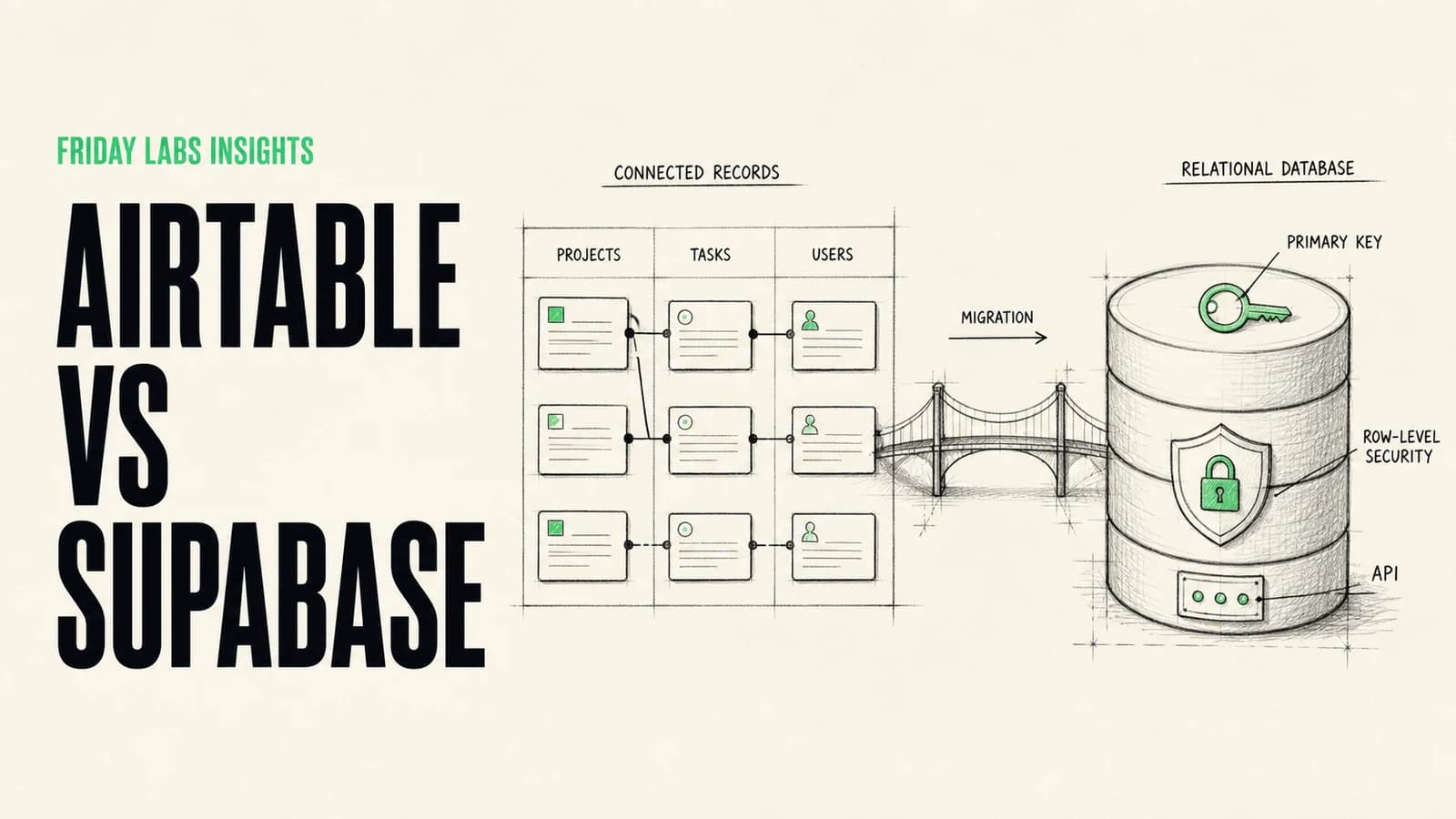
Airtable and Supabase can both sit at the center of a business system, but they solve different problems.
Airtable is a collaborative operations interface built around relational data. Supabase is an application backend built around PostgreSQL. One helps people work directly with records. The other gives software a durable database, authentication, storage, APIs, and infrastructure.
They are not perfect substitutes, and many teams are best served by using both.
The short answer: Use Airtable when people need to view, edit, filter, and coordinate operational records directly. Use Supabase when applications and automations need a reliable source of truth, stronger permission logic, transactional behavior, or developer-controlled infrastructure. Use a hybrid when teams still want Airtable’s interface but core data should live in Postgres.
Airtable vs Supabase at a glance
| Area | Airtable | Supabase |
|---|---|---|
| Primary identity | Collaborative operations platform | Application backend built on PostgreSQL |
| Main user | Operators and business teams | Developers and product teams |
| Interface | Tables, views, forms, interfaces, automations | Dashboard, SQL editor, APIs, client libraries |
| Data model | Relational records with linked fields | Full relational PostgreSQL database |
| Permissions | Workspace, base, interface, and field-oriented controls | Database roles, Row Level Security, Auth, API policies |
| Automation | Built-in automations plus external platforms | Database triggers, functions, webhooks, Edge Functions, external tools |
| Application backend | Useful for prototypes and internal tools | Designed for production applications |
| Best fit | Human-centered operational workflows | Software-centered systems of record |
The main decision is not which product is more powerful. It is whether people or software are the primary operators of the data.
What Airtable is good at
Airtable gives a team a shared, structured workspace without requiring them to think like database administrators.
Its most useful strengths are:
- Familiar spreadsheet-like editing.
- Linked records that express relationships without writing SQL.
- Views tailored to different roles and workflows.
- Forms and interfaces for controlled data entry.
- Built-in automations for common actions.
- Fast iteration by operations teams.
A campaign team can connect clients, deliverables, creators, approvals, and invoices while giving each person a useful view. A sales team can manage accounts, contacts, opportunities, and follow-ups. An implementation team can track requirements, systems, owners, and launch status.
Airtable’s linked record model creates a reciprocal relationship between records, which is enough structure for many internal workflows without requiring a custom application.
Airtable’s real advantage is the human interface
The value is not that Airtable stores rows. Many products store rows. The value is that business users can inspect and modify those rows, create filtered views, and change the operating process quickly.
That flexibility is especially valuable while a process is still evolving. Building custom software too early can freeze assumptions that the team has not validated yet.
What Supabase is good at
Supabase gives a team a full PostgreSQL database plus services commonly needed around an application.
Its database overview includes Postgres, table and SQL tooling, Row Level Security, Auth, Storage, Realtime, and Edge Functions. That makes it a foundation for customer portals, internal software, data products, and automation systems where the database must behave like infrastructure rather than a shared workspace.
Supabase is a stronger fit when:
- Several applications write to the same source of truth.
- The data model contains meaningful constraints and relationships.
- Users should see different records based on identity or role.
- Writes must be transactional and consistent.
- The system needs an API designed for application traffic.
- Developers need migrations, environments, and code-based change control.
- File storage, authentication, or realtime behavior is part of the product.
Supabase’s real advantage is control
Postgres gives developers explicit types, constraints, indexes, transactions, functions, and query tools. Supabase exposes APIs around that database and lets teams secure access with Row Level Security.
That power comes with responsibility. Supabase’s shared responsibility model makes clear that customers still own schema design, access policies, secrets, application security, and the safe use of the platform.
The point where Airtable starts to strain
Do not migrate because a base has “a lot of rows.” A hard product limit is not the same as an operational threshold.
Look for symptoms:
- Automations regularly hit rate or usage limits.
- Several external systems write to the same records concurrently.
- Record updates require complex validation across multiple tables.
- People can accidentally change fields that applications depend on.
- Permissions need to be enforced per customer, account, or record.
- Reporting queries slow down normal operations.
- The team is maintaining sync logic between many bases.
- Auditability and deployment control matter more than ad hoc editing.
- A customer-facing application depends on the data.
Airtable’s Web API is limited to five requests per second per base, and plan-level usage limits also apply. Its built-in “Find records” automation action returns up to 1,000 records per run. Those numbers may be completely adequate, or they may shape the architecture of a high-volume system.
The decision should follow workload patterns, not fear of a specific record count.
The point where Supabase is unnecessary
Supabase is not automatically the more professional choice.
It may be premature when:
- The process is changing every week.
- Only a few internal operators use the data.
- The team needs views and forms more than application APIs.
- No developer will own schema changes and security policies.
- The system does not require customer-facing permissions.
- A clear source-of-truth model has not been agreed.
A poorly designed Postgres database with no owner is not an upgrade from a well-run Airtable base. It is simply harder to change.
Security and permissions
Both platforms can be used securely, but the control model differs.
Airtable permissions
Airtable organizes access around workspaces, bases, interfaces, views, and field or table editing capabilities. It is effective when known collaborators need different ways to interact with the same operational data.
Review who can edit schema, duplicate data, create shared links, access integrations, and change automations. A convenient interface can make governance feel less urgent than it is.
Supabase permissions
Supabase applications commonly expose data through APIs, which makes database policy central. Row Level Security can restrict which rows each authenticated user may read or modify. Supabase’s API security guidance recommends enabling RLS on exposed schemas and treating the service-role key as a server-side secret.
RLS is powerful, but a missing or overly broad policy can expose data. Test permissions as separate user roles, not only as an administrator.
Reliability, backups, and change control
For an operations workspace, recovery may mean restoring records, checking revision history, and repairing an automation. For an application backend, it also means database backups, schema migrations, deployment coordination, and tested rollback procedures.
Supabase provides daily backups on eligible plans and offers Point-in-Time Recovery as an option, as described in its backup documentation. A responsible team still tests restoration assumptions and keeps database migrations in version control.
In Airtable, document important field names, automations, external dependencies, and owners. A renamed field or deleted view can break downstream integrations even when the base itself remains available.
The hybrid architecture
The best design is often:
- Supabase holds canonical customers, permissions, transactions, and application data.
- An internal tool or controlled sync exposes selected operational records to Airtable.
- Operators use Airtable for planning, review, enrichment, and exceptions.
- Approved changes flow back through validated APIs rather than unrestricted table sync.
This keeps Airtable’s operator experience while protecting the core data model.
The key is to assign ownership field by field. If both systems can update the same field without a conflict rule, the sync will eventually become the product.
Define:
- Which system is authoritative for each entity and field.
- Which direction data moves.
- Whether sync is real-time or scheduled.
- How deletions and conflicts are handled.
- How failed syncs are retried.
- What operators can edit.
- How identities map across systems.
Example decisions
A services delivery tracker
If the team needs clients, projects, milestones, owners, links, and filtered views, Airtable may be enough. Add automations for reminders and handoffs. Move core data only when integrations, permissions, or reporting demands justify it.
A customer portal
Use Supabase or another application backend. Customer identity, per-account permissions, file access, and transactional updates should not depend on a shared internal table interface.
A content operation
Airtable is often a strong editorial workspace for briefs, status, assets, approvals, and publishing dates. If the public website or product reads from it directly at scale, add a controlled publishing layer or synced database.
An AI agent with company data
Use a proper application backend when the agent needs authenticated, user-specific records or writes consequential changes. Airtable can still act as an operator queue for review and exceptions.
How to migrate from Airtable to Supabase
Do not begin with a bulk export. Begin with the data model.
1. Identify systems of record
List every table, field, formula, view, automation, integration, and external dependency. Mark which records are authoritative and which are copies.
2. Normalize only where it helps
Translate repeated text and linked records into clear entities and relationships. Do not turn a straightforward workflow into an academic schema exercise.
3. Define constraints and permissions
Specify required fields, unique values, valid status transitions, deletion behavior, and access rules before importing data.
4. Clean and test a sample
Deduplicate records, fix broken links, map identities, and test a representative slice. Verify counts and relationships with automated checks.
5. Run both systems deliberately
If a transition period is required, define one-way ownership and a cutover date. Avoid an indefinite two-way sync.
6. Move the operator experience
The database is not the complete system. Build or configure the forms, queues, dashboards, and exception views people need to do their jobs.
Supporting video: Fireship gives a concise technical overview of Supabase, including PostgreSQL, authentication, storage, realtime features, and application APIs.
Frequently asked questions
Is Supabase an Airtable alternative?
It can replace Airtable as the underlying data store, but it does not replace Airtable’s operator-friendly interface by itself. A Supabase implementation may need an internal tool, admin panel, or custom portal.
Can Airtable be used as a production database?
It can support prototypes and many internal systems. For a customer-facing application with high concurrency, transactional requirements, or fine-grained row permissions, a conventional application database is usually the stronger foundation.
Is Supabase only for developers?
Its dashboard is approachable, but production schema, security, migrations, and application integration require technical ownership. Business users will usually interact through an application or internal tool rather than the database dashboard.
Should we use Airtable and Supabase together?
Yes, when the responsibilities are clear. Supabase can be the canonical backend while Airtable provides a controlled operating surface for planning or review. Avoid unrestricted two-way sync.
When should we migrate?
Migrate when the current system creates measurable risk or friction in reliability, permissions, automation, reporting, or application development. Do not migrate only because a different stack appears more technical.
Sources and methodology
This guide uses current primary documentation from Airtable and Supabase, combined with Friday Labs’ experience designing workflows, internal software, and operational data systems. Exact plan limits and product capabilities change, so verify the current documentation before implementation.