The most important decision in an AI automation project is not which model to use. It is how much freedom the system should have.
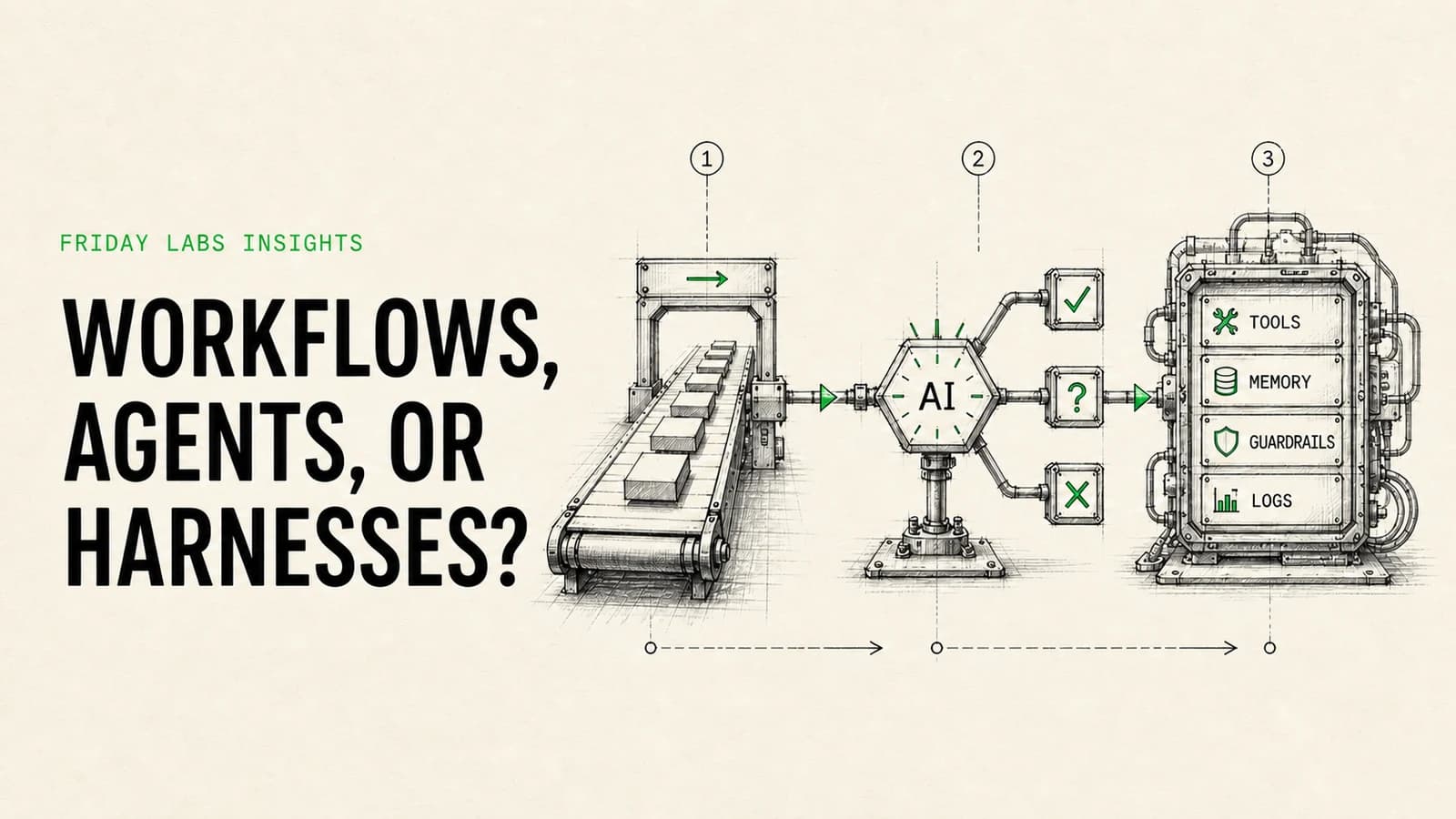
A deterministic workflow follows a path you define. An AI agent chooses at least part of its own path. An agent harness is the software around that agent that controls its tools, context, permissions, memory, evaluation, and recovery.
Those approaches are not competitors. The strongest business systems usually combine them.
The short answer: Use deterministic automation for predictable work, add focused AI steps when one part requires judgment, use an agent when the route cannot be fully known in advance, and build a custom harness only when the agent needs durable context, proprietary tools, stronger controls, or product-level reliability.
The four levels of automation
It helps to separate four architectures that are often grouped together under the label “AI agent.”
| Architecture | How it works | Best for | Main risk |
|---|---|---|---|
| Deterministic workflow | Executes predefined triggers, rules, and actions | Stable, repeatable processes | Brittle exceptions |
| Workflow with an AI step | Follows a fixed path but uses a model for one bounded task | Classification, extraction, drafting, summarization | Unchecked model output |
| AI agent | Selects tools and next steps based on a goal and current context | Variable research, triage, and multi-step reasoning | Unpredictable paths and compounding errors |
| Custom agent harness | Wraps one or more agents in purpose-built software, permissions, memory, traces, tests, and recovery logic | High-value or productized agent systems | Engineering and maintenance overhead |
This distinction matches the practical definition used by Anthropic’s engineering team: workflows use predefined code paths, while agents dynamically direct their own process and tool usage.
1. Deterministic workflow automation
A deterministic workflow says: when this happens, do these specific things in this specific order.
Examples include:
- Create a CRM contact when a qualified form is submitted.
- Validate required fields before an invoice enters approval.
- Send a reminder if a deal has not moved for seven days.
- Copy a signed contract to the correct client folder.
- Reconcile known fields across two systems.
The system can include branches, retries, loops, formulas, and error handlers. It is still deterministic because the builder defines every allowed route.
This should be the default for high-volume work with stable rules. It is easier to test, cheaper to run, and simpler to explain during an incident.
2. A workflow with a bounded AI step
Many useful “AI automations” are normal workflows with one carefully bounded model call.
The workflow still controls the sequence. AI handles a task that is difficult to express as a conventional rule, such as:
- Classifying an inbound request by intent.
- Extracting terms from a document with inconsistent formatting.
- Drafting a reply from approved source material.
- Summarizing a call into a fixed CRM schema.
- Rating whether a lead appears to match an agreed profile.
This architecture is often the best first use of AI. It gives the model enough flexibility to be useful without giving it control of the entire process.
The output should be validated before the next action. If the model is expected to return JSON, check the schema. If it makes a recommendation, set confidence thresholds and define when a human must decide.
3. An AI agent
An agent receives a goal, examines context, chooses from available tools, evaluates the result, and decides what to do next. You define the boundaries, but not every step.
That flexibility is useful when the correct route depends on information discovered during the task. A research agent might search several sources, notice a conflict, gather more evidence, and then produce a cited brief. A support agent might inspect account history, check an order, search documentation, and decide whether to answer or escalate.
Agents are valuable when the environment is variable. They are wasteful when the path is already known.
An agent that merely moves a field from a form into a CRM is a slower and less reliable version of a normal workflow. An agent that investigates an unfamiliar exception across several tools may be worth the additional cost and complexity.
4. A custom agent harness
The model is only one part of a production agent. The harness is the surrounding system that makes the model usable inside a real business.
A serious harness may provide:
- A restricted set of tools and permissions.
- Instructions assembled from the current user, task, and policy.
- Retrieval from approved company knowledge.
- Session state or durable memory.
- Structured outputs and schema validation.
- Human approval before consequential actions.
- Traces of model calls, tool calls, and decisions.
- Evaluations that measure quality over time.
- Timeouts, retry policies, budgets, and kill switches.
- A user interface for review, correction, and escalation.
OpenAI’s Agents SDK documentation describes many of these building blocks, including tools, handoffs, guardrails, sessions, human intervention, and tracing. The harness turns those pieces into an operating system for a specific job.
Why most business systems should be hybrid
The strongest pattern is usually deterministic on the outside and flexible on the inside.
Consider an inbound sales process:
- A fixed workflow captures the lead, verifies consent, normalizes the fields, and checks for duplicates.
- A bounded AI step classifies the request and summarizes relevant context.
- An agent researches the account only if the lead meets defined criteria.
- A human approves any personalized outbound message.
- A fixed workflow records the outcome, assigns ownership, and starts the correct follow-up sequence.
The workflow handles facts and state transitions. AI handles ambiguity. The human controls consequential judgment.
That separation makes the system easier to inspect and repair. If the CRM record was not created, look at the workflow. If the classification was poor, inspect the prompt and evaluation set. If the agent chose an odd tool sequence, inspect the trace. Each layer has a clear responsibility.
A five-question decision framework
Before choosing an architecture, answer these questions in order.
1. Can the correct path be described in advance?
If yes, start with a workflow. A process does not become more valuable because an agent controls it.
If the route depends on discoveries made during execution, an agent may be justified. Research, exception handling, and open-ended investigation are common examples.
2. Is the uncertainty local or end to end?
If one step is uncertain, use one AI step. If the system must repeatedly choose what to do next, consider an agent.
For example, extracting a product name from an email is a local uncertainty. Investigating why an account is at risk across CRM notes, support tickets, billing history, and product usage is an end-to-end uncertainty.
3. What happens when the system is wrong?
The cost of failure should determine the control level.
Low-risk actions can run automatically with monitoring. Medium-risk actions may need confidence thresholds or sampled review. High-risk actions, such as sending money, changing access, publishing claims, or committing the company to a contract, should require explicit approval.
“Human in the loop” is too vague on its own. Define the exact action that pauses, who approves it, what information they see, and what happens if no one responds.
4. Can you observe what happened?
A production system needs more than a final success or error status. Agents in particular need traces that show which instructions, tools, inputs, and intermediate decisions produced the result.
If you cannot explain a failure, you cannot improve the system safely. Our guide to AI agent logs, traces, evaluations, and approvals covers the minimum operating layer.
5. Who will own it after launch?
Choose an architecture the organization can maintain.
A visual workflow may be a better operational asset than custom code if a trained internal operator will own it. A custom harness may be the right choice if the system is central to a product, needs specialized permissions, or requires automated testing and deployment.
The initial build is not the full cost. Include documentation, monitoring, updates, incident response, and the people required to make changes.
Where each approach works best
Lead management
Use deterministic automation for form capture, enrichment requests, deduplication, assignment, and reminders. Add AI for free-text qualification or call summaries. Use an agent only when account research changes based on what it discovers.
Customer support
Use workflows for routing, service-level timers, and status changes. Use retrieval and AI for suggested responses. Use an agent when resolution requires several tools and variable investigation. Require approval for refunds, account changes, or claims outside approved policy.
Finance and operations
Use deterministic systems for reconciliations, validation, approvals, and record updates. AI can extract fields or flag anomalies. Keep final approvals and ledger-impacting actions under strict rules.
Internal knowledge
Use retrieval when employees need answers grounded in changing company documents. Add an agent only when the task also requires actions, such as gathering evidence from several systems and preparing a complete brief.
Research and reporting
Agents are well suited to gathering and comparing variable information. A fixed workflow should still schedule the run, provide the approved source list, validate the output format, store the report, and alert the owner when evidence is weak.
Common architecture mistakes
Calling every model step an agent
This makes the system sound more advanced but obscures how it really works. Clear architecture leads to clearer testing and ownership.
Using an agent where rules already exist
Known rules belong in code or workflow logic. Models should not repeatedly infer a policy that can be stated once.
Giving broad tool access too early
Start with the fewest permissions required. Read access and draft actions are safer than write access. Add capabilities only after the system performs reliably under realistic tests.
Testing only the happy path
Real processes contain missing fields, duplicated records, timeouts, conflicting instructions, stale knowledge, and partial failures. Test those cases before increasing autonomy.
Skipping the operating layer
A prototype can look impressive without logs, alerts, approvals, or recovery. A production system cannot. Reliability work is part of the product, not cleanup after launch.
Supporting video: Anthropic explains why teams should start with simple, composable patterns and add agentic complexity only when the task requires it.
A practical implementation sequence
For most teams, the safest sequence is:
- Map the current process, including exceptions and approvals.
- Define the business result and how it will be measured.
- Automate the stable path with deterministic logic.
- Add one bounded AI capability where rules fail.
- Build a representative evaluation set from real examples.
- Add traces, failure handling, and a human escalation path.
- Introduce agentic decisions only where they materially improve the result.
- Review performance, cost, and failure patterns on a fixed schedule.
This sequence produces value earlier and makes each increase in autonomy deliberate.
If the process is still unclear, an AI Opportunity Audit should come before a platform decision. The audit identifies the workflows, data, risks, and ownership model before anyone commits to a build.
Frequently asked questions
Is an AI agent the same as workflow automation?
No. A workflow follows paths defined by the builder. An agent can choose its next action based on the goal and current context. A workflow can contain an agent, and an agent can trigger workflows.
What is an agent harness in plain English?
It is the software around the model. It controls what the agent can access, which tools it can use, how it remembers context, when a human must approve an action, and how the team tests and monitors it.
Are AI agents better than Zapier, Make, or n8n?
Not generally. Those platforms are often better for deterministic processes. Each also offers ways to include AI. The correct choice depends on whether the path is known, how much control is required, and who will maintain the system. See our Zapier, Make, n8n, and custom harness comparison.
When should a business build a custom agent harness?
Consider one when the agent is strategically important, needs proprietary tools or interfaces, requires strict permission and testing controls, or must behave like a maintained software product. Do not build one merely to automate a stable sequence of steps.
How much autonomy should an agent have?
Only as much as the task requires. Start with read-only tools, bounded actions, spending limits, approval gates, and clear stop conditions. Increase autonomy after measured performance supports the change.
Sources and methodology
This guide combines Friday Labs’ process design standards with current primary documentation from Anthropic on agent architectures, the OpenAI Agents SDK, Make’s scenario framework, and Zapier’s product documentation. Product capabilities change, so confirm current platform details before committing to an implementation.